
Sort an Elementor Loop Grid by a custom field (ACF or meta key)
Elementor Pro’s Loop Grid can order posts by date, title and a few built-in fields, but not by your own custom fields such as a price, an event date or a rating. LoopSort adds that without code, and it works in the free plugin.
Step by step
- Edit the page in Elementor and click your Loop Grid.
- In Content → Query, choose the Source (post type) as usual, for example “Events”.
- Open the LoopSort section (below Query) and switch on Order by custom field.
- Pick a Field source, for example ACF field, then the Field. Or choose Meta key and type the key.
- Set Compare values as: Numeric for prices and counts, Text for names.
- Choose the Order and where Posts without a value go, then click Publish.
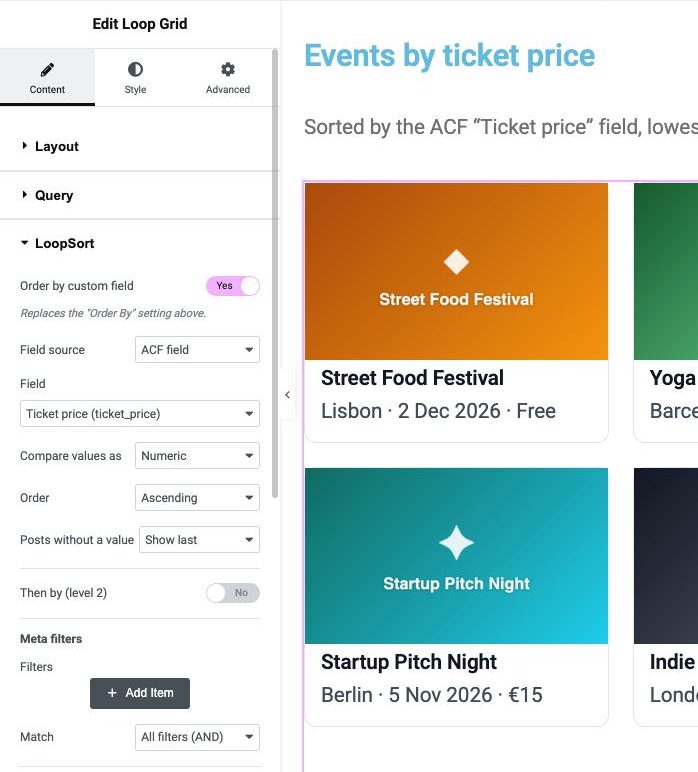
Settings reference
| Setting | What it does |
|---|---|
| Order by custom field | Turns LoopSort sorting on. It replaces the Loop Grid’s own Order By setting above it. The LoopSort section is hidden when the grid’s source is Current Query (archive templates). |
| Field source | Where the field comes from: ACF field, or Meta key to type one. LoopSort Pro adds Meta Box, JetEngine, Pods and WooCommerce. |
| Field | The fields of that source assigned to the grid’s post type that hold one value. If the list is empty, use Meta key instead. |
| Meta key | Any custom field key: letters, numbers, _ and - only. Hidden keys starting with _ are blocked, except public WooCommerce keys such as _price. |
| Compare values as | Text sorts alphabetically, Numeric numerically (so 9 comes before 10). LoopSort Pro adds decimal, date, date-time and Unix timestamp. |
| Order | Ascending (A→Z, low→high, oldest→newest) or Descending. |
| Posts without a value | Show last or Show first. Posts missing the field are never dropped. |
| Hide password-protected posts | The Loop Grid normally lists password-protected posts with their content locked (“Protected: …”). Turn this on to leave them out. |
Which fields can be sorted?
Any ACF field that stores one value: text, number, range, email, URL, select, radio, button group, true/false, date picker and date-time picker, including fields inside ACF groups. Repeaters, galleries and multi-select fields hold several values per post, so they can’t be sorted and aren’t listed.
Tip: ACF stores date-picker values as
YYYYMMDD, so sorting them as Numeric already gives the right order in the free plugin. LoopSort Pro adds proper date and date-time types for other formats and for the date presets.
Note: LoopSort never widens what your grid shows. It only changes the order (and, in Pro, can narrow the list with filters). Drafts, private posts and other content your grid doesn’t already show never appear because of LoopSort.