
Advanced sorting: dates, decimals, more field sources and multi-level sorting (Pro)
LoopSort Pro adds date, date-time, decimal and timestamp value types, fields from Meta Box, JetEngine, Pods and WooCommerce, sorting by up to three fields, and a way to keep a hand-picked order.
More value types
| Compare values as | Use for |
|---|---|
| Text, Numeric | As in the free plugin. |
| Decimal number (2 places) | Prices with cents, ratings such as 4.75. |
| Date (YYYYMMDD or YYYY-MM-DD) | ACF, Meta Box, JetEngine and Pods date fields. |
| Date and time (YYYY-MM-DD HH:MM) | Date-time pickers. |
| Unix timestamp | Fields saved as a timestamp, e.g. Meta Box “save as timestamp” or JetEngine dates. |
When you pick a field from a list, LoopSort Pro shows how that plugin stores it (for example “stored as timestamp”), so you can choose the matching type.
More field sources
| Field source | Fields listed |
|---|---|
| ACF field | Single-value ACF fields (free and Pro). |
| Meta Box field | Single-value Meta Box fields of the post type. Cloneable and multiple fields are left out. |
| JetEngine field | JetEngine meta fields of the post type. |
| Pods field | Pods fields of the post type. |
| WooCommerce product data | Price (current), Regular price, Sale price, Stock quantity, Total sales, Average rating, Review count. |
Sort by up to 3 fields (“Then by”)
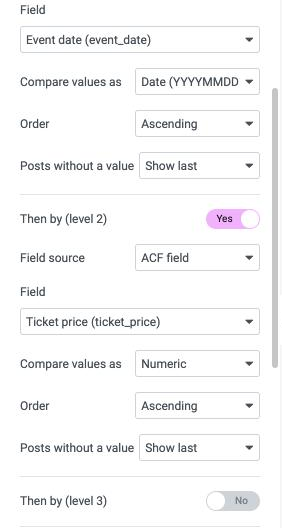
Below the first field, Then by (level 2) and Then by (level 3) add tie-breakers. Each level has the same settings as the first: source, field, type, order and where empty values go. Examples: event date, then ticket price; city A–Z, then price low to high.
Keep the order of selected posts
If the Loop Grid’s query uses Include → Manual selection, switch on Keep the order of selected posts to show them exactly in the order you picked them. It’s ignored while Order by custom field is on.