
Filter an Elementor Loop Grid by custom fields and date presets (Pro)
LoopSort Pro’s meta filters and date presets narrow which posts a Loop Grid shows, for example only upcoming events, products in stock or listings under a price. Filters can only remove posts, never add posts the grid wouldn’t already show.

Meta filters
Open Meta filters in the LoopSort section and add one or more filters. Set Match to All filters (AND) or Any filter (OR).
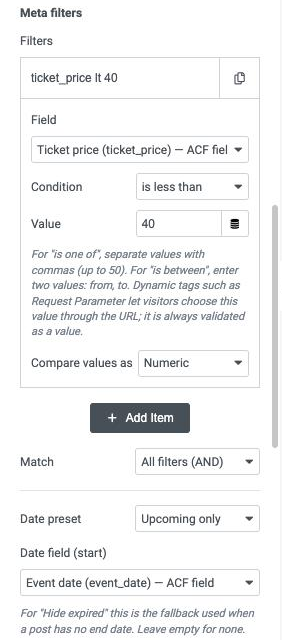
| Setting | What it does |
|---|---|
| Field / Meta key | A field from the list (any supported source), or a meta key you type. |
| Condition | is equal to · is not equal to · is greater than · is greater than or equal to · is less than · is less than or equal to · contains · is one of · is between · has a value · has no value |
| Value | For is one of, separate up to 50 values with commas. For is between, enter two values: from, to. Elementor dynamic tags work here. |
| Compare values as | Text, Numeric, Decimal, Date, Date and time or Unix timestamp, as for sorting. |
Warning: Dynamic values can come from visitors. A dynamic tag such as Request Parameter lets the URL set the filter value, which is useful (e.g.
?city=Paris) but means visitors can change it. LoopSort validates the value and only ever narrows the grid, but don’t use visitor-controlled values to hide content that must stay secret.
Note: If a filter is set up incorrectly, for example with an unknown meta key, LoopSort fails closed: the grid shows no posts rather than ignoring the filter.
Date presets: upcoming, past and hide expired
| Date preset | Shows |
|---|---|
| Upcoming only | Posts whose start date is today or later (site time zone). |
| Past only | Posts whose start date is before today. |
| Hide expired | Posts that haven’t ended yet: the End date field is today or later, falling back to the start date when a post has no end date. |
Pick the Date field (start) (and, for Hide expired, the End date field) and how each is Stored as: Date, Date and time, or Unix timestamp. “Today” follows the time zone in Settings → General.
Several post types and child pages
- Also include post types adds up to 9 more public post types to the grid’s source (10 in total). Internal post types of Elementor and other plugins aren’t offered.
- Only children of shows Any parent, The current post (e.g. sub-pages of the page being viewed) or A specific post by its ID.
- While any filter, preset or “Only children of” is active, sticky posts aren’t pinned to the top, so they can’t slip past the filter.