Codeventure Infotech Store

For Elementor Pro Loop Grid & Loop Carousel

LoopSort Pro

Sort and filter any Elementor Loop Grid by custom fields.

Sort the Elementor Pro Loop Grid by price, event date, rating or any ACF, Meta Box, Pods, JetEngine or WooCommerce field. Add a visitor sort dropdown, show only upcoming events or products under a price, and sort by up to three fields. No code.

  • Elementor & Elementor Pro 4.2+
  • Free LoopSort plugin
  • WordPress 6.5+ · PHP 7.4+
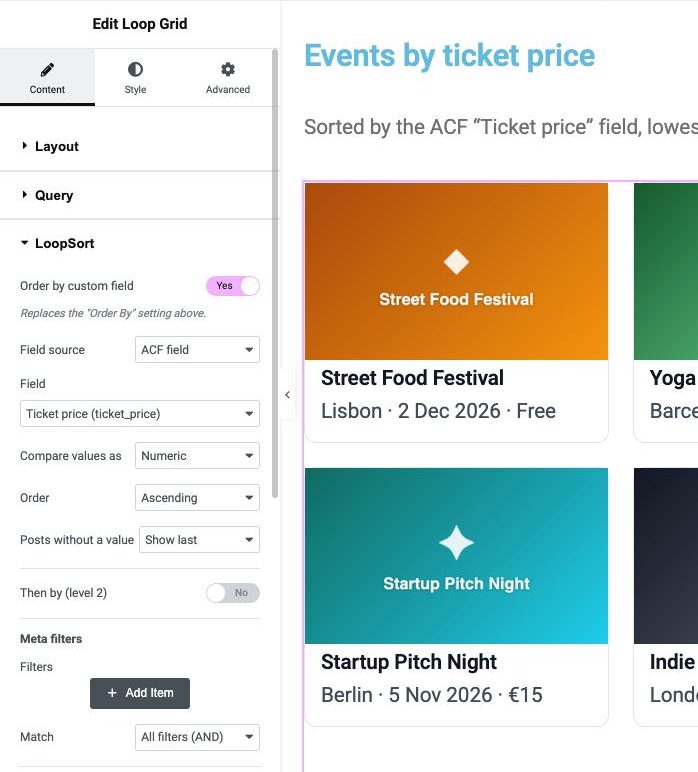
LoopSort settings inside the Elementor Loop Grid panel, sorting events by an ACF ticket price field

Features

Everything the Elementor Loop Grid is missing

  • Visitor Sort Control widget

    A sort dropdown, buttons or radio list next to any Loop Grid. Visitors choose “Price: low to high”, “Date: soonest first” or “Highest rated”, and the grid re-sorts without a page reload.

  • Filter by any custom field

    Show tickets under €40, products in stock or listings in one city. Eleven conditions, from “is less than” to “is between” and “is one of”, combined with AND or OR.

  • Upcoming, past and expired events

    Date presets show only upcoming events, only past ones, or hide events that have ended, using your site’s time zone so “today” is always right.

  • Sort by up to three fields

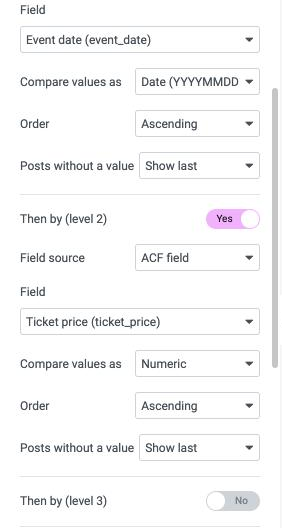
    Event date, then ticket price, then title. “Then by” levels break ties the way you want instead of at random.

  • Works with the fields you already use

    ACF, Meta Box, Pods, JetEngine and WooCommerce price, stock, sales and rating appear in a list. Text, numbers, decimals, dates, date-times and Unix timestamps all sort correctly.

  • Shareable, cache-friendly URLs

    Each sort choice is kept in the URL, so visitors can bookmark or share “cheapest first”, and pagination, Load more and page caches keep the order.

  • Loop Carousel and mobile control

    Sort and filter the Loop Carousel too, and show fewer posts per page on tablets and phones.

  • Safe by design

    LoopSort only reorders or narrows what your grid already shows. Drafts and private posts never appear, and a misconfigured filter shows nothing rather than everything.

How it works

From a static grid to a smart catalogue

Sort Control widget

Let visitors choose the order

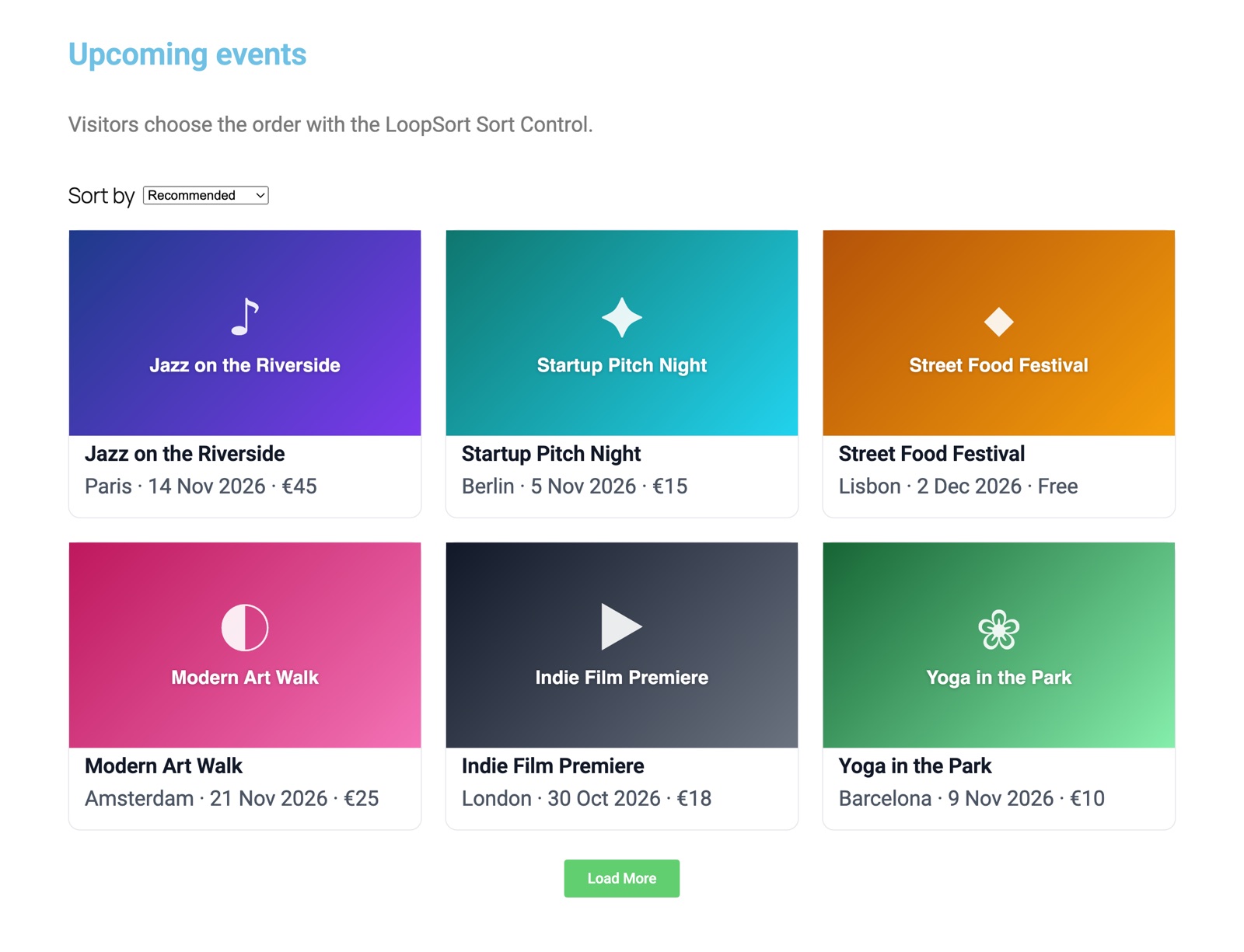
Drop the Sort Control next to your Loop Grid and add options with your own labels. The grid re-sorts in place, and page 2, Load more and the Taxonomy Filter keep the visitor’s choice.

  • Dropdown, buttons or radio list
  • Sort by any custom field or by date, title or comments
  • The choice is kept in the URL, so it can be shared
Event grid with a “Sort by” dropdown set to Price: high to low

Meta filters + date presets

Show only the right posts

“Ticket price is less than 40” plus “Upcoming only”, sorted by date and then by price. Set it once in the editor and the grid keeps itself up to date as events pass.

  • Compare text, numbers, decimals and dates
  • Values from Elementor dynamic tags, such as a URL parameter
  • Upcoming only, past only or hide expired
Loop Grid showing only upcoming events with tickets under €40

Buttons style

One-tap sorting on mobile

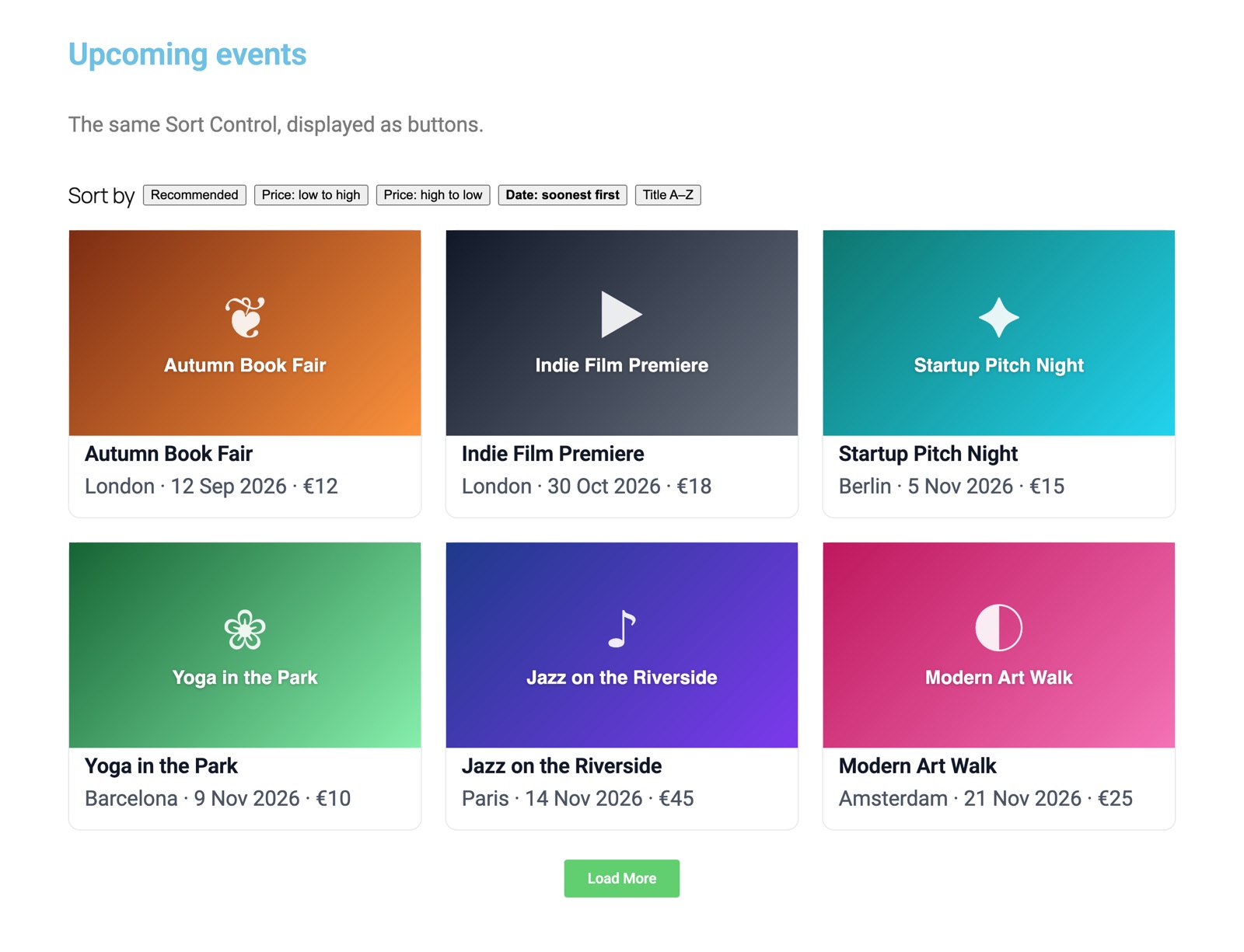
Prefer buttons to a menu? Switch the Sort Control to buttons for big, thumb-friendly choices, styled from the Elementor Style tab to match your theme.

  • Colours, borders, padding and active state
  • Works without JavaScript as a normal form
  • Several grids per page, each with its own control
Sort buttons above an event grid sorted by date, soonest first

Inside Elementor

Set up in the panel you already know

Everything lives in the Loop Grid’s Content tab, right below Query. Pick a field from the list, choose how to compare it, decide where empty values go, and publish.

  • Up to three sort levels
  • Posts without a value shown first or last, never lost
  • No shortcodes, no PHP, no template edits
LoopSort “Then by” sort levels in the Elementor Loop Grid panel

How to sort an Elementor Loop Grid by a custom field

Elementor Pro’s Loop Grid can order posts by date, title and a few built-in fields, but not by your own custom fields, such as an ACF price, an event date or a star rating. Normally that means writing a custom query in PHP. With LoopSort you switch on Order by custom field in the Loop Grid’s LoopSort section, pick the field and choose Numeric, Text or (in Pro) Date. It takes under a minute, and posts without a value are shown first or last instead of disappearing. Step-by-step instructions are in the sorting guide.

Add a sort dropdown to the Elementor Loop Grid

Visitors expect to sort a catalogue the way they sort a shop: cheapest first, newest first, highest rated. LoopSort Pro’s Sort Control widget adds exactly that above any Loop Grid, as a dropdown, buttons or radio buttons. Each option can sort by any custom field or by date, title, menu order or comment count, and the grid updates without reloading the page. See the Sort Control guide.

Filter a Loop Grid by ACF fields, WooCommerce data or dates

Meta filters narrow the grid with conditions such as is less than, is between, is one of, contains and has a value, combined with AND or OR. Date presets keep event listings current automatically: Upcoming only, Past only or Hide expired, based on your site’s time zone. Learn more in meta filters and date presets.

Built for real websites

  • Events and courses: upcoming events sorted by date, then by price, with past events hidden automatically.
  • WooCommerce shops: sort and filter products by current, regular or sale price, stock, total sales, average rating or review count.
  • Real estate and directories: listings by price, size or city, with a sort dropdown for buyers.
  • Portfolios, team pages and blogs: order by a custom “priority” number, by any custom field, or keep a hand-picked order.

Works with Elementor’s pagination, Load more and caching

LoopSort sorts on the server, so every page of the grid uses the same order, Load more and infinite scroll never show duplicates, and the Taxonomy Filter keeps the order. Cached pages (WP Rocket, LiteSpeed, Cloudflare) already contain the sorted grid. Read how LoopSort works with pagination and caching.


Free vs Pro

Start free. Go Pro when you’re ready

FeatureLoopSort (free)LoopSort Pro
Sort by one custom field, as text or number✓✓
ACF fields from a list, or any meta key✓✓
Posts without a value shown first or last✓✓
Hide password-protected posts✓✓
Pagination, Load more, infinite scroll and Taxonomy Filter✓✓
Date, date-time, decimal and Unix timestamp sorting–✓
Meta Box, JetEngine, Pods and WooCommerce fields–✓
Sort by up to 3 fields (“then by”)–✓
Keep the order of hand-picked posts–✓
Meta filters (11 conditions, AND / OR)–✓
Date presets: upcoming, past, hide expired–✓
Several post types in one grid, child pages–✓
Sort Control widget for visitors–✓
Different posts per page on tablet and mobile–✓
Loop Carousel support–✓
SupportWordPress.org forumEmail

Get LoopSort Pro – from $25/yr

Pricing

Choose your plan

Prices in USD. Sales tax / VAT is calculated at checkout.

Billing cycle
  • Single site

    For one website or online shop.

    $25 / year

    1 site, billed yearly

    Buy now
    • Front-end Sort Control widget (dropdown & buttons)
    • Visitor sorting with shareable URLs
    • Filter Loop Grids by any custom field
    • ACF, Meta Box, Pods & JetEngine support
    • “Then by” multi-level sorting
    • Works with Loop Grid & Loop Carousel
  • Agency

    For agencies and busy studios.

    $119 / year

    20 sites, billed yearly

    Buy now
    • Front-end Sort Control widget (dropdown & buttons)
    • Visitor sorting with shareable URLs
    • Filter Loop Grids by any custom field
    • ACF, Meta Box, Pods & JetEngine support
    • “Then by” multi-level sorting
    • Works with Loop Grid & Loop Carousel

Secure checkout by Freemius · Refund policy · Licence terms

Turn your grids into a shop window

From $25 a year for one site, or a one-time lifetime licence. Pro features keep working even if you don’t renew; renewals bring updates and support.

Get LoopSort Pro

FAQ

Questions about LoopSort Pro

Can I sort an Elementor Loop Grid by an ACF field?

Yes, and the free LoopSort plugin already does it. Switch on “Order by custom field” in the Loop Grid’s LoopSort section, pick the ACF field and compare it as numeric or text. LoopSort Pro adds date, decimal and timestamp types, more field plugins and up to three sort levels.

Do I need the free LoopSort plugin?

Yes. LoopSort Pro builds on the free LoopSort plugin from WordPress.org: install and activate the free plugin first, then upload LoopSort Pro. Your existing settings carry over.

Does it work without Elementor Pro?

No. LoopSort extends the Loop Grid and Loop Carousel widgets, which are part of Elementor Pro. You need Elementor and Elementor Pro 4.2 or later.

Which fields can I sort and filter by?

Single-value fields from ACF, Meta Box, Pods and JetEngine, WooCommerce product data (price, stock, sales, rating, review count), and any public custom field by its meta key. Repeaters and multi-select fields hold several values, so they can’t be sorted.

Can visitors sort WooCommerce products by price?

Yes. Add the Sort Control widget above a Loop Grid of products and create options such as “Price: low to high” using the WooCommerce “Price (current)” field.

Can I show only upcoming events?

Yes. Set the LoopSort Pro date preset to “Upcoming only” and pick your event date field. Past events drop off automatically each day, based on your site’s time zone.

Will posts without the field disappear?

No. Posts missing the field are shown first or last, as you choose. Only filters you add yourself remove posts.

Does it work with caching plugins?

Yes. LoopSort sorts on the server, so cached pages contain the sorted grid, and each visitor sort choice has its own URL. If your cache ignores query strings, add “loopsort” and “loopsort_device” to its list.

Does it work with the new Atomic Loop (Editor V4)?

Not yet, because Elementor doesn’t yet offer a public way to extend it. LoopSort works with the classic Loop Grid and Loop Carousel, which you can use on any page, including pages built with atomic elements.

What happens if my licence expires?

Your sites keep every Pro feature. Only updates and support stop until you renew.

How many sites can I use it on?

Choose a licence for 1, 5 or 20 sites, billed yearly, or pay once for a lifetime licence.

What happens after I buy?

You get an email with your licence key, invoice and download link straight away. Install the plugin, enter your licence key and you are ready to go. Everything is also available in your account.

Can I upgrade or add more sites later?

Yes. You can upgrade your plan or licence size at any time from your account and only pay the difference.

Yogesh Popat, developer of LoopSort and founder of Codeventure Infotech Available for new projects

Like what you see? Work with the developer

Hire Yogesh Popat for your website

I’m Yogesh, the developer behind LoopSort and the founder of Codeventure Infotech. When you hire me, you talk to me directly and I work on your project myself: no account managers, no hand-offs, no surprises.

  • Talk directly to me from the first call to launch
  • WordPress, WooCommerce & Elementor websites, built to load fast
  • Custom plugins & features, like the ones in this store

Privacy preferences

Choose which cookies we may use. You can change your choice at any time using “Cookie settings” in the footer. See our Privacy Policy for details.

Strictly necessary

Remember your privacy choice (cv_consent, 6 months) and keep unsent form drafts in your browser. These are required for the site to work and can’t be switched off.

Always on

Google Analytics (_ga, _ga_*, up to 2 years) helps us count visits and see which pages are useful. Data is aggregated and is not used for advertising.

Sale or sharing of personal information

We do not sell your personal information or share it for cross-context behavioural advertising (CCPA/CPRA). We also honour Global Privacy Control signals.

Never